Integration with Secret Managers
- Thunder Client integrates with secret managers like Azure Key Vault and AWS Secrets Manager to fetch secrets and use variables in your requests using the
{{variable}}format.
Azure Key Vault
- Thunder Client integrates with Azure Key Vault to fetch secrets and use them in your requests.
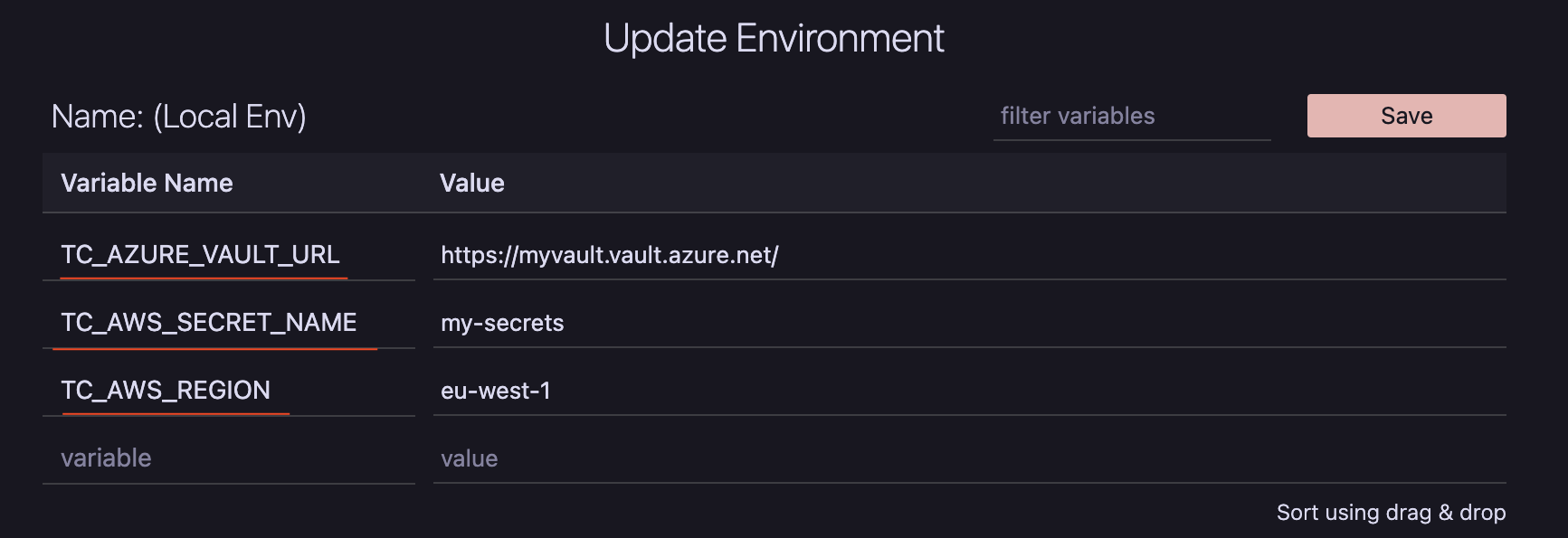
- Set the variable
TC_AZURE_VAULT_URLin your staging and production environments, and Thunder Client will automatically retrieve secrets from Azure Key Vault.
| Variable | Sample Value |
|---|---|
| TC_AZURE_VAULT_URL | https://myvault.vault.azure.net/ |
AWS Secrets Manager
- Thunder Client integrates with AWS Secrets Manager to fetch secrets and use them in your requests.
- Set the
TC_AWS_SECRET_NAMEandTC_AWS_REGIONvariables in your staging and production environments, and Thunder Client will automatically retrieve secrets from AWS Secrets Manager.
| Variable | Sample Value |
|---|---|
| TC_AWS_SECRET_NAME | my-secrets |
| TC_AWS_REGION | us-west-1 |
Authentication
- Thunder Client uses the default credentials from your machine to authenticate with the secret managers. Thunder Client does not store any cloud credentials.
- The simplest way to set up these credentials is to sign in with the Azure CLI or the AWS CLI, as described below.
Azure CLI
-
Install the Azure CLI .
-
Sign in to your Azure account. If you have access to more than one subscription, you are asked to select one during sign-in. Select the subscription that contains the Key Vault.
az loginOn a machine without a browser, use
az login --use-device-codeand complete the sign-in on another device. -
To switch to a different subscription later, run:
az account set --subscription "<subscription-name-or-id>" -
Check that you can read secrets from the Key Vault:
az keyvault secret list --vault-name <vault-name>
Permissions
- Your account needs permission to read secrets from the Key Vault. The permission you need depends on the vault’s permission model:
- Azure RBAC (recommended, and the default for new vaults): assign the Key Vault Secrets User role.
- Access policy (legacy, for older vaults): grant the
GetandListsecret permissions.
- Follow least privilege: assign the role at the scope of the single Key Vault, not the subscription or resource group.
- If the vault has a firewall or private endpoint, make sure your machine’s network is allowed to reach it.
Non-interactive login
- On build servers or other machines where an interactive login is not possible, use one of these options, in order of preference:
-
Managed identity, if the machine runs in Azure. For a system-assigned identity:
az login --identityFor a user-assigned identity, also pass its client ID:
az login --identity --client-id <client-id> -
Service principal with a certificate. The PEM file must contain both the private key and the certificate.
az login --service-principal -u <app-id> --certificate /path/to/cert.pem --tenant <tenant-id> -
Service principal with a client secret, only if the options above are not possible. A secret passed with
-pcan be seen by other users on the machine in the process list while the command runs, so use this only on machines that only you use, and rotate the secret regularly.az login --service-principal -u <app-id> -p "$AZURE_CLIENT_SECRET" --tenant <tenant-id>
-
AWS CLI
-
Install the AWS CLI .
-
Set up your credentials using one of these options:
-
IAM Identity Center (SSO) (recommended, uses short-lived credentials): set up a named profile and sign in. Then set the
AWS_PROFILEenvironment variable to the profile name (see the note below).aws configure sso aws sso login --profile <profile-name>By default,
aws sso loginopens a browser on the same machine. On a machine without a browser, add--use-device-codeand complete the sign-in on another device. -
Access keys: use this only if SSO is not available. Run the command below and enter your access key ID, secret access key and default region.
aws configureAccess keys are long-lived and are saved in plain text in
~/.aws/credentials. Never commit or share this file, and rotate the keys regularly.
-
-
Check that you can read the secret. This command prints only the secret name, not its value:
aws secretsmanager get-secret-value --secret-id <secret-name> --region <region> --query Name --output text
Permissions
- Your IAM user or role needs the
secretsmanager:GetSecretValuepermission on the secret. Restrict it to the ARN of your secret, not*. If the secret is encrypted with a customer managed KMS key, thekms:Decryptpermission is also required.
Using a named profile
- If you use a named profile instead of the
defaultprofile, set theAWS_PROFILEenvironment variable to the profile name. - VS Code reads environment variables only when it starts. Start VS Code from the same terminal (for example,
code .), or set the variable at the system level. A variable exported in a terminal is not visible to VS Code if you open it from the Dock or Start menu.
SSO sessions
- SSO sessions expire. When the session expires, run
aws sso loginagain.
Signing out
-
On a shared machine, or when you no longer need access, remove the stored sign-in tokens:
az logout aws sso logout -
aws sso logoutsigns out of all SSO profiles on the machine, not only the current one.
Troubleshooting
| Problem | Likely cause and fix |
|---|---|
| Access denied or forbidden | The signed-in identity does not have permission to read the secret. See the Permissions notes above. |
| Vault or secret not found | Check the TC_AZURE_VAULT_URL, TC_AWS_SECRET_NAME and TC_AWS_REGION values. For Azure, also check that the correct subscription is selected. |
| Credentials expired or not found | Sign in again with az login or aws sso login. |
| Works in the terminal but not in Thunder Client | VS Code does not see your credentials or AWS_PROFILE. Start VS Code from the terminal where you signed in. |
Logs
- The logs will show errors if there are any issues with fetching the secrets from the secret managers.