Server-Sent Events
Server-Sent Events (SSE) is a standard way for a server to push updates to a client over a single, long-lived HTTP connection. The client sends one request, and the server keeps the response open and writes events to it as they happen. Responses use the text/event-stream content type.
Use an Event Stream Request to test live feeds, job progress updates, notifications, and AI APIs that stream their answer token by token.
How SSE Works
The server sends each event as a few lines of text, separated by a blank line:
event: message
id: 42
retry: 3000
data: {"token": "Hello"}| Field | Meaning |
|---|---|
data | The event payload. Often JSON. |
event | Optional event name, such as message, update, or done. |
id | Optional event ID. Clients use it to resume after a reconnect. |
retry | Optional reconnect delay in milliseconds. |
Unlike WebSocket, SSE is one-way: the server streams to the client, and the client cannot send more messages on the same connection.
Connect to a Stream
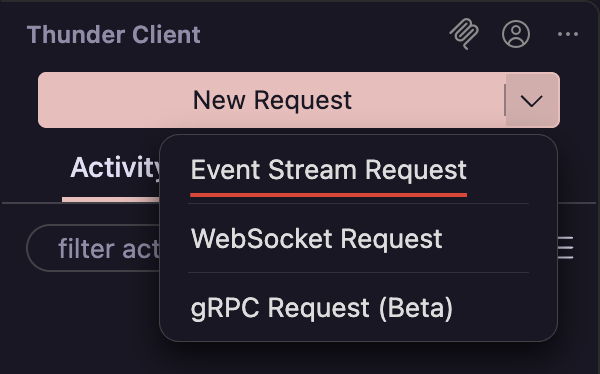
Create an Event Stream request
In the sidebar, click the arrow next to New Request and select Event Stream Request.
Configure the request
Enter the URL and choose the method. Add params, headers, auth, or a body exactly as you would for an HTTP request. For example, many AI APIs use POST with a JSON body.
Start streaming
Click Send to connect. The button changes to Stop while the stream is open. Click Stop at any time to close the connection.
View Events
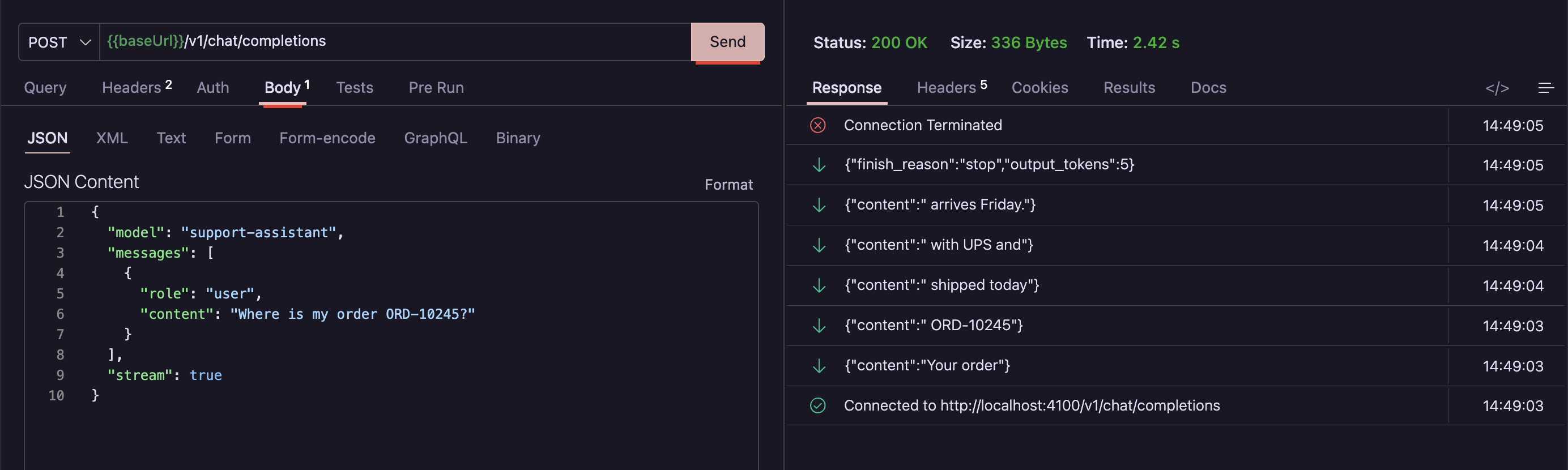
- A Connected row appears as soon as the server responds. Each event is then added as it arrives.
- The newest event is at the top, with the time it was received.
- Each row shows the event
data. Click a row to expand it and see every field, such asevent,id, andretry. - The response Size and Time update live while the stream is open.
- When the server ends the stream, or you click Stop, a Connection Terminated row is added. If the connection failed, the row shows the reason.
Headers, Auth, and Variables
- Headers, auth, cookies, proxy, and certificate settings work the same as for HTTP requests.
- Environment variables in the URL, headers, auth, and body are resolved when you click Send.
Accept: text/event-stream, or check whether the API needs a flag such as "stream": true in the body.Test Streams in the Collection Runner
Event Stream requests can be part of automated runs in the Collection Runner.
- The runner waits for the stream to end before it moves on to the next request.
- All received events are saved as the response body, so tests can assert on the content of the stream.
- Open the request from the run results to see the saved events and the time each one arrived.
- Clicking Stop on the run also closes any open stream.
Troubleshooting
| Problem | What to check |
|---|---|
| The whole response arrives at once | The server or a proxy may be buffering the response. Check that the server returns Content-Type: text/event-stream and flushes after each event. |
| The connection closes right away | Expand the Connection Terminated row to see the reason. An auth error usually means the token is missing, expired, or in the wrong header. |
| A collection run never finishes | The stream never ends. Remove the request from the run, or use an endpoint that closes the stream when it is done. |