WebSocket
WebSocket is a protocol for two-way, real-time communication. The client opens a connection with an HTTP handshake, and then the connection stays open: both the client and the server can send messages at any time, with no new request for each message.
Use a WebSocket Request to test chat apps, live dashboards, notifications, multiplayer games, trading feeds, and pub/sub APIs.
Connect
Create a WebSocket request
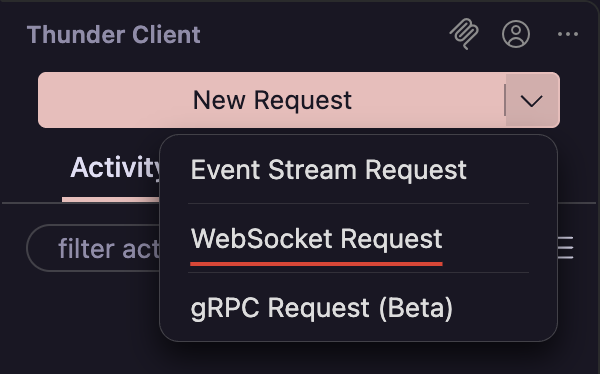
In the sidebar, click the arrow next to New Request and select WebSocket Request.
Enter the URL
Enter the server URL, for example wss://echo.websocket.org.
wss://— Secure connection over TLS. Use this for public and production servers.ws://— Unencrypted connection. Common for local development. If you leave out the scheme,ws://is used.
Add handshake details
Add any Query params, Headers, or Auth the server needs. They are sent once, with the opening handshake, and apply for the whole connection. Basic and Bearer auth are supported.
Connect
Click Connect. When the connection opens, a connected event appears in the response and the button changes to Stop. Click Stop to close the connection.
Send Messages
Write the message
Open the Message tab, choose JSON or Text, and type the message.
{ "type": "subscribe", "channel": "orders" }Send it
Click Send. You can edit the message and send again as many times as you need while the connection is open.
The last message is saved with the request, so it is ready the next time you open it.
{{variable}} in a message is not replaced.View Messages
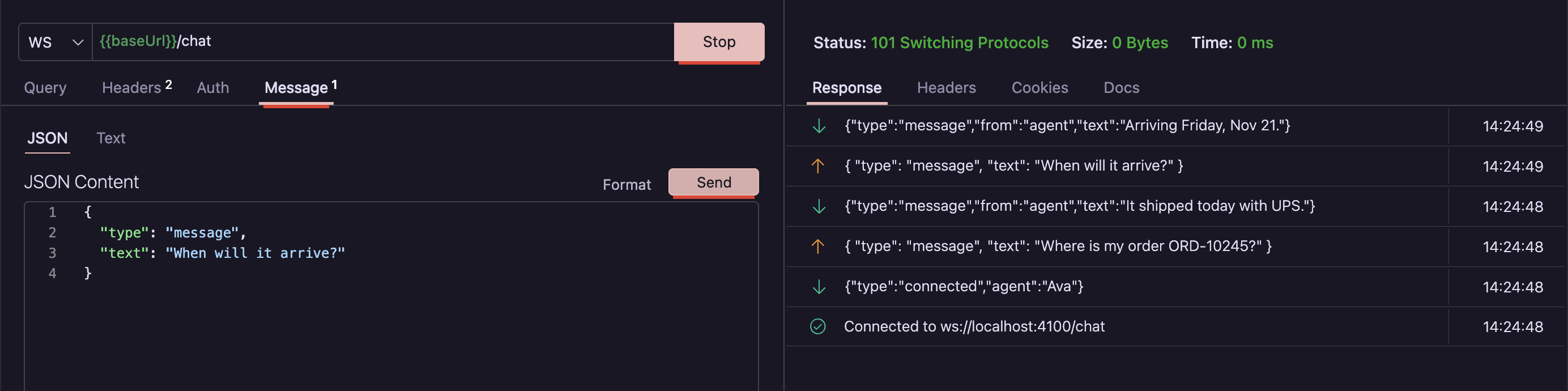
- Sent and received messages appear in one list, with the newest at the top.
- Each row shows the time and an icon for whether the message was sent or received.
- Click a row to expand the full message.
- Connection events, such as connected, closed, and errors, appear in the same list, so you can see exactly when and why a connection ended.
Limitations
WebSocket requests are designed for interactive testing. Compared to HTTP requests:
- The Tests and Pre Run tabs are not available.
- Auth supports Basic and Bearer only. For other schemes, add the credentials in Headers or Query.
- Code snippets are not available.
Troubleshooting
| Problem | What to check |
|---|---|
| The connection fails right away | Check the scheme. Most public servers need wss://, not ws://. |
| The server rejects the handshake | Check that required headers, tokens, or query params are set. Expand the error row for details. |
| The connection closes after a while | Many servers close idle connections. Send a message the server accepts to keep it open, or reconnect. |
Variables appear as {{name}} in messages | Variables are only resolved in the URL, headers, and auth. Type the value into the message instead. |